
Which ability helps you get there?
The official Steam achievements name Grapple, Magnetic Grabber, Magnet Wheels, Paintgun and Phase Shifter. The developer's gameplay overview shows how movement abilities can open up the house.
Grapple / rope-swings
The overview introduces the rope as a way to cross gaps. If the route stops at a gap, look at the demonstrated rope movement with your partner. Watch from 0:41 ↗
Find the attachment before moving
The community grapple guide describes designated anchors and handles as targets. Use that distinction to plan your attempt:
- Name the target. Tell your partner which anchor or handle you are aiming for. A nearby wall is not the same thing as a grapple point.
- Attach, then check. Follow the current aiming prompt and confirm the rope is connected before moving the car.
- Agree on the action. For a paired mechanism, wait for both players to attach. For a crossing, identify the next anchor or platform first.
The recorded ×2 lever example below shows the attachment check and coordinated pull in one specific mechanism.
Magnet Wheels / magnetic wheels
The trailer explicitly describes movement onto walls and ceilings. A route may continue above floor level: look up before assuming you have reached a dead end. Watch from 0:38 ↗
Trace the route to its next platform
The community magnetic-wheels guide points players toward metal surfaces. Treat that as a place to investigate, then check whether your wheels actually attach.
- Find the beginning and end. Look along the intended wall or ceiling path and locate the platform it leads to.
- Check each transition. Confirm attachment as the route changes direction; do not assume every adjoining surface works.
- Stop at a break in the path. Look for another platform or a rope anchor. Ask your partner to watch the next landing or mechanism while you inspect the route.
Magnetic Grabber / magnet grabs
See the tool's official introduction at 0:44 ↗
Look for an object that changes the route
The community grabber guide describes moving objects and clearing a partner's path. Use that as a starting point when simply driving forward cannot solve the obstruction:
- Identify the object and its destination. Look for something movable near the blocked mechanism and a place it could fit.
- Divide the observation. Let one player handle the object while the other watches the destination or mechanism.
- Check what changed. Watch for a cleared route or a response from the mechanism before trying another object.
These community-based suggestions do not specify compatible objects, reach or weight limits.
Paintgun and Phase Shifter
Both have named ability-acquisition achievements. Use the current game's tutorial when you obtain them; the sources reviewed here do not yet establish their controls or puzzle rules.
Names follow Steam achievements; alternative wording follows the English press-kit FAQ. The official overview explains broad movement, while the linked community guides provide additional practices. These do not establish the unlock order or a tested solution to every puzzle. The separately reviewed lever example follows below.
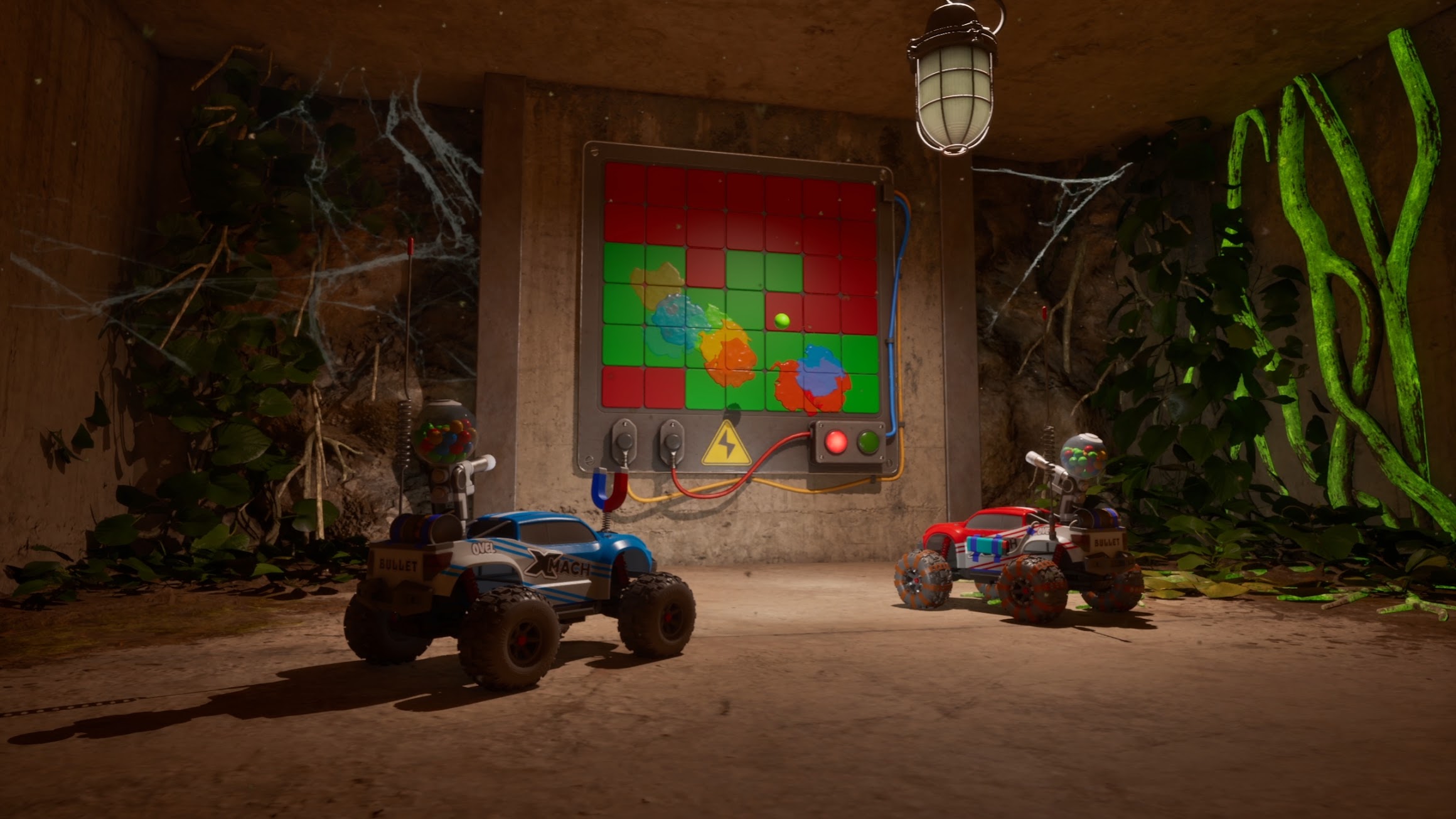
How two players pull the ×2 lever panel
Look for the wall panel with two red-handled levers, red and green indicator lights, and a ×2 mark. In Butch13 Gaming and LadyCee0711's demonstration, each car attaches its rope to a different lever, then both reverse together.
01 / BOTH ATTACHED
One car per handle.
Count down, then reverse together.
02 / CHECK THE RESULT
Both handles are down.
The upper indicator lights green.
- Take a separate handle. Each player targets one of the two levers. At 25:13, both ropes are visibly attached. Check that both players are ready before moving.
- Pull together. The players count down and reverse away from the panel. The pull begins around 25:14. Agree who will give the countdown.
- Check the panel. After a short cutaway, the camera returns to both handles down and the upper light green at 25:22–25:23. That is the visible confirmation to look for in this example.
If it has not activated, compare your setup with the ready frame: one rope on each handle and both cars prepared to reverse. This is a check suggested from the successful attempt, not a diagnosis of every failed pull.
The creator identifies this footage as a pre-release full version. We reviewed the timestamped captions and action frames, not our own game session. This example establishes activation of this panel only; it does not prove that all steam obstacles are cleared or that every paired lever uses identical rules in the current build.
Gadget upgrades and cosmetics are different
In Devlog 3, dated 11 August, the developer describes choosing your car's color at the start and collecting customization wheels, antennas and horns while exploring. Distinguish those appearance items from the magnetic-wheels ability when discussing equipment with your partner.
Supporter Pack cosmetics stay with the full-game owner. The developer's invitation thread confirms that a Pass guest does not receive those extras. One owner and their Pass partner can play the full adventure together, as confirmed in the official FAQ.
What are you finding around the house?
A new car part and a piece of the professor's story serve different purposes. Alongside cosmetic parts, the developer's story devlog describes three kinds of narrative discovery:
| Discovery | What it adds |
|---|---|
| Nodes | Professor Bloom's voice: guidance through the house, explanations of recent events and memories of its past. |
| Scannable objects | Personal notes written by or to the professor. Some also explain the background of inventions such as the magnetic wheels. |
| Memory cards | Audio logs of conversations and arguments that help explain what happened in the house. |
Use the Journal to connect the clues
The Journal gathers these story fragments in one place so you can return to them later. The developer presents this deeper story exploration as optional: you can investigate as you go or continue driving and solving puzzles with your partner.
Our suggestion: agree whether this is a story-hunting session or a session focused on moving forward. That gives both players a shared pace when one wants to inspect an object and the other is ready to drive on.
Working toward the collection achievements? Keep track with the seven-goal completion checklist, including memory cards, scannable objects and customization parts.
See the game in motion
OFFICIAL GAMEPLAY OVERVIEW
WheelMates: Official Gameplay Overview
The developer introduces this trailer in the 12 August gameplay announcement. These approximate shortcuts take you to the movement and exploration explanations in the 1:59 overview.
- 0:38Magnetic wheels: walls and ceilings
- 0:41Rope movement across gaps
- 0:44Magnetic Grabber introduction
- 0:49Return to earlier rooms with new abilities
Explore the laboratory together
New rooms and routes become available as you progress. At 0:49 in the overview, the developer explains that new abilities give you reasons to revisit earlier rooms and find hidden paths and clues. The official FAQ also confirms that there is no separate free-drive mode.
Communication and timing are part of the co-op challenges. Our practical suggestion: agree on the gadget and target before an attempt, then describe the result to your partner.
Blocked at the Backyard antennas? If the grates stop you reaching the lever in Far Beyond Driven, check the specific progression report and 8 September update before spending more time searching for a gadget solution.
Equipment and mode sources were checked on 7 September 2026 (UTC). The achievement names, story devlog, official overview's 0:30–0:57 caption segment, linked community guides and Backyard issue sources were checked on 8 September. Video shortcuts are approximate and based on visible automatic captions; the lever sequence was also checked against action frames. Announcement dates follow Steam's Asia/Shanghai display. Use the current game's instructions for controls.